The CNC Panel Simulator with Machine Simulation
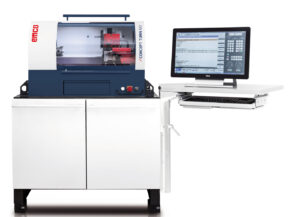
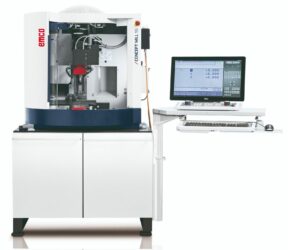
EMT CNC Panel Simulator (CPS) — industrial Siemens (CPS-S) or FANUC (CPS-F) control feel, plus live 2D/3D machine simulation on a portable classroom unit.
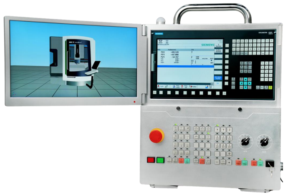
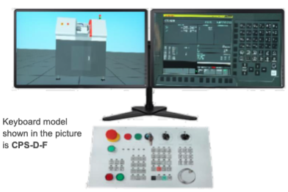
The EMT CNC Panel Simulator incorporates the same class of equipment found on a standard CNC machine using Siemens or FANUC controls. A multi-point touch screen and a full set of push-button controls let students program, configure, and run operations used every day in CNC machining.
A simple parameter change switches the unit from mill to lathe. The chosen option determines whether the simulator runs a Siemens or FANUC control version. A 15.6-inch intuitive touch screen shows live machine movement, tooling, and part machining.
CNC simulators play a crucial role in modern manufacturing by enhancing training, improving efficiency, reducing costs, and ensuring quality in CNC machining operations. It has become indispensable for both educational institutions and industrial settings seeking to optimize their manufacturing processes.
Features
- Touch screen and full QWERTY-style key panel with durable resin keys
- USB and SD card interface
- 2D and 3D part simulation
- Ability to run 4+1 or 3+2 axis programs
- Tool center point control (3 linear + 1 rotary axis)
- Mill / lathe conversion programming
Benefits
- Replicates Siemens / FANUC control interfaces used on machining centers worldwide
- Programs can be stored, created, edited, and run from SD and USB memory
- Students can review part design before a machining cycle
- Programming flexibility across many CNC machine types and industries
- Fast practice of tool offsets and work offsets
Classroom Design
Lightweight and portable
Designed for the classroom, the unit sits on a desktop and can be moved between labs.
Part programming and CAM interface
Display and key size are intended to feel like a real machine control. Users program and simulate on the virtual machine. Multiport connectivity supports external CAM program testing — either from a library machine or from user-defined machine specifications.
Connectivity
- USB for external drives, program storage, transfer, and DNC operations
- Ethernet and Wi-Fi for local-network access
- HDMI so instructors can send the display to a larger classroom screen
Mill, lathe, and control options
The simulator can be initialized as mill control or lathe control, and as a Siemens or FANUC panel depending on the model/option selected.
How Labs Use It
- Training and education — Practice CNC programming and operation without occupying a physical machine. Beginners learn in a risk-free environment.
- Programming verification — Catch collisions, toolpath problems, and syntax errors before a live cycle. Test toolpaths, speeds, and feeds virtually.
- Prototyping and design — Validate machining processes early and cut material waste and machine time.
- Machine setup and calibration — Rehearse tooling, workholding, and parameters; simulate the effect of setup adjustments.
- Production planning — Visualize the cut for scheduling and capacity studies.
Basic Features and Component Details
- Select machine model
- Select and set workpiece
- Select and set tool
- Select and set clamp
- Rapid simulation
- Set workpiece zero by manual
- Import NC program
- Import custom clamp (.stl format for milling)
- Debug NC trace
- Measure workpiece
- Collision detected
- Alarm warning
- Cutting workpiece in real time
- Simulation of a real machine operational panel
- Switch machine mode: AUTO, REF, JOG, MDI, WHEEL, and EDIT
- Handwheel operation — feedrate override, axis select, operate wheel
- AUTO operation — select current NC program, single block, skip block, feed hold/stop, simulate the NC program
- Machine alarm light
- MDI operation — input NC program, program protect, simulate the NC program
- JOG operation — rapid/normal feed and feedrate override, spindle CW/CCW and stop, spindle override, JOG spindle, open/close machine port, open/close coolant, manual tool change and tool-number display
- EDIT operation — new, input, and edit NC code; program protect
- Emergency stop
- Coolant, sound, and chip/iron-fragment effects
- Switch 3D shown mode
- Show tool trace
- Show tool number
- Transfer and simulate NC codes from CAM software
Technical Specifications
| Specification |
CPS-F (FANUC) |
CPS-S (Siemens) |
| External dimensions |
420 × 255 × 565 mm (W × D × H) |
484.80 × 241 × 565 mm (W × D × H) |
| Weight |
10.3 kg |
| Display |
15.6″ LCD, 10-point capacitive touch, plus 9.7″ LCD |
15.6″ LCD, 10-point capacitive touch, plus 8″ LCD |
| Operation section |
MDI unit (Fanuc 0iMF Plus keys; also supports plugin keyboard); machine operator’s panel; E-stop; override switch; manual pulse generator; universal power unit; program protect key; machine ready button |
MDI unit (QWERTY keys; also supports plugin keyboard); machine operator’s panel; E-stop; override switch; manual pulse generator; universal power unit; program protect key; machine ready button |
| Input / output |
USB memory, HDMI |
| Communication |
RJ45 (wireless) |
| Input rating |
100–240 VAC, 2.34 A, 50–60 Hz |
| Other |
Folding bracket |
| Switchable system |
Mill system (3-axis + spindle) or lathe system (2-axis + spindle) |
| Display languages |
11 languages |
| Programming |
Import NC program or edit with MDI; 3D simulation; inch/metric switchable |
| Part program storage |
10 MB, 1024 registered programs |
| Tool offsets |
128 tool offset pairs (T) and 400 tool offset pairs (M) |
| Work coordinates |
G52–G59 + 48 additional on mill and lathe |
| Network |
Can connect to a computer network |
CNC Panel Options
FANUC (CPS-F): Fanuc 21iT, Fanuc 21iM, Fanuc 0iMF Plus, Fanuc 0iTF Plus, Fanuc 0iMF, Fanuc 0iTF
Siemens 2- & 3-axis (CPS-S): Siemens 802DT, 802DM, 808DT, 808DM, 828DM, 828DT, 840DM, 840D sl
Siemens 4- & 5-axis: Siemens 828DM, 840DM, 840D sl
Catalogue source: EMT Digital Motion / EMT Global Catalogue 2025–26, pages 38–41, CNC Panel Simulators / CNC Simulation Software. Models shown: CPS-F and CPS-S. Specifications are furnished for informational use and are subject to change without notice.