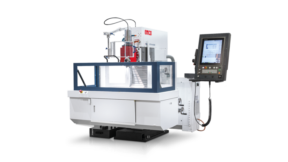
The CNC Universal Desktop Simulator with Machine Simulation
EMT Global Desktop CNC Panel Simulator — multi-brand CNC training with virtual machine simulation.
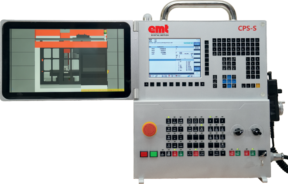
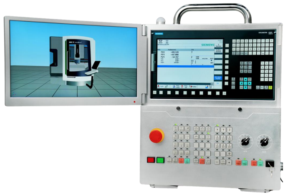
Unlock the future of CNC training and manufacturing education with the EMT Global Desktop CNC Panel Simulator. Designed for versatility and classroom use, this unit bridges classroom learning and real shop-floor operation. Its standout feature — an interchangeable keyboard system — lets users switch between Siemens, FANUC, and Haas panels, giving learners a true multi-brand experience without buying three separate hardware setups.
Built for universities, technical institutions, and training centers, the simulator provides an immersive environment for programming, machining operations, and troubleshooting. Authentic control-panel interfaces help students and engineers build industry-ready skills while institutions cut equipment cost and training time.
Why Choose the Desktop CNC Panel Simulator?
- Seamless multi-panel experience — Instantly switch between Siemens, FANUC, and Haas panels with modular keyboard swapping.
- Cost-effective training — One simulator delivers the experience of three, reducing the need for multiple machines.
- Industry-ready learning — Authentic control-panel operation that supports employability.
- Robust and scalable — Built for classroom durability and integration with CNC software and machines.
- Smart investment — A future-proof platform for flexible, comprehensive CNC skill training.
Supported Controllers & Simulation Panels
Fanuc, Siemens, and Haas 2/3/4/5-axis CNC machine simulation panels are offered with 2/3-axis simulation software as specified below.
FANUC
- FANUC 0iTF Plus
- FANUC 0iMF Plus
- FANUC 31i Model B5 (4/5 axis)
Switchable FANUC systems listed in the technical table also include Fanuc 0iMF Plus (3 axis), Fanuc 0iTF Plus, Fanuc 21iM (3 axis), Fanuc 21iT, and Fanuc 31i Model B (4–5 axis).
Siemens
- Siemens 828DT
- Siemens 828DM (3/4/5 axis)
Switchable Siemens systems listed in the technical table also include SIEMENS 828DM (3 axis), SIEMENS 828DT, SIEMENS 808DM (3 axis), SIEMENS 808DT, and SIEMENS 840DM (4–5 axis).
Haas
- Haas ST
- Haas VM (3/4/5 axis)
Switchable Haas systems listed in the technical table include HAAS VM (3 axis), HAAS ST, and HAAS VM (4–5 axis).
Machine Simulation & Classroom Workflow
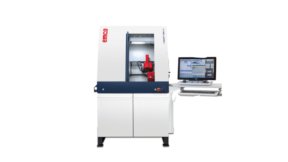
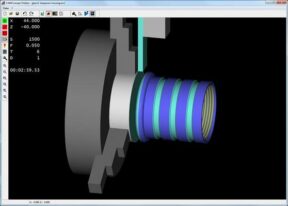
The desktop unit is designed for the classroom: it sits on a bench, stays portable, and uses dual 15.6-inch capacitive touch displays — one for the virtual CNC controller and one for live 3D machine simulation. Learners can program and simulate with a control layout that matches industrial display and key feel.
Multiport connectivity supports external CAM program testing and simulation on a virtual machine, either from a library machine or from user-defined machine specifications. USB storage supports program transfer and DNC-style workflows. Ethernet (RJ45) provides network access. HDMI lets an instructor send the display to a larger classroom screen.
The platform can be initialized as mill or lathe control and swapped across FANUC, Siemens, and Haas panel families. Typical training uses include:
- Skill development — Practice CNC programming and operation without tying up a live machine.
- Safer first contact — Beginners learn in a risk-free environment before touching production equipment.
- Program verification — Catch collisions, toolpath problems, and syntax errors before a real cycle.
- Optimization — Test toolpaths, speeds, and feeds virtually.
- Setup practice — Rehearse tooling, workholding, offsets, and calibration.
- Production planning — Visualize the machining process for scheduling and capacity studies.
Key Training Benefits
- Replicates Siemens / FANUC / Haas interfaces found on machining centers worldwide
- Create, edit, store, and run programs from USB memory
- Review part design in 3D before a machining cycle
- Programming flexibility across a wide range of industrial CNC machines
- Fast practice of tool offsets and work offsets
Technical Specifications
Model family: CPS-Desktop (Haas / FANUC / Siemens)
| Specification |
CPS-Desktop |
| External dimensions |
430 × 140 × 585 mm (W × D × H) |
| Weight |
Approx. 6.0 kg |
| Display |
Dual 15.6″ LCD with 10-point capacitive touch |
| Input / output |
USB memory, HDMI |
| Communication |
Ethernet (RJ45) |
| Input rating |
100–240 VAC, 2.0 A, 50–60 Hz |
| Other |
Folding bracket |
| Display languages |
11 languages: English, German, French, Spanish, Chinese (Simplified), Korean, Magyar, Portuguese, Polish, Russian, Turkish |
| Programming |
Import NC programs or edit with MDI; 3D simulation; inch/metric switchable |
| Network |
Can connect to a computer network |
Operation Section (by control family)
FANUC: Virtual CNC controller and MDI (Fanuc 0iMF Plus and other Fanuc-family controller keys; also supports plugin keyboard). Machine operator’s panel, emergency stop, override switch, manual pulse generator, universal power unit, program protect key, machine ready button.
Siemens: Virtual CNC controller and MDI (Siemens 828D and other Siemens-family controller keys; also supports plugin keyboard). Machine operator’s panel, emergency stop, override switch, pendant manual pulse generator, universal power unit, program protect key.
Haas: Virtual CNC controller unit (also supports plugin keyboard). Machine operator’s panel, emergency stop, manual pulse generator, universal power unit.
Program Storage, Offsets & Work Coordinates
| Item |
FANUC |
Siemens |
Haas |
| Part program storage |
10 MB, 1024 registered programs |
10 MB, 1024 registered programs |
10 MB, 1024 registered programs |
| Tool offsets |
400 tool offset pairs (T) and 400 tool offset pairs (M) |
16×9 tool offset pairs (T) and 49×9 tool offset pairs (M) on Siemens 808D; magazine tool number × 9 tool offset pairs (T) and (M) on Siemens 828D & 840DM |
400 tool offset pairs (T) and 400 tool offset pairs (M) |
| Work coordinates |
G52–G59 + 48 additional on mill and lathe |
G54–G59, G500 on Siemens 808D mill and lathe; G54–G57, G500 on Siemens 828D lathe; G54–G57, G500 on Siemens 828D mill; G54–G57, G500 on Siemens 840DM mill |
G52–G59 on mill and lathe |
Catalogue source: EMT Digital Motion / EMT Global Catalogue 2025–26, CNC Panel Simulators / CNC Simulation Software section. Specifications are furnished for informational use and are subject to change without notice.