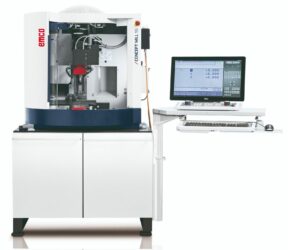
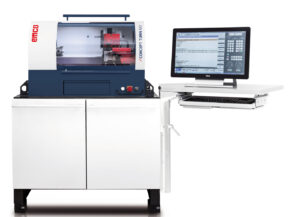
Unlock the future of CNC training and manufacturing education with the Edsolab Universal CNC Panel Simulator. Designed with versatility and user-centric innovation, this simulator bridges the gap between classroom learning and real-world shop floor operations. Its standout feature – the interchangeable keyboard system – allows users to seamlessly switch between Siemens, FANUC, and Haas panels, giving learners and professionals a true multi-brand experience without the need for multiple hardware setups.
Built for universities, technical institutions, and training centers, the simulator offers an immersive, hands-on environment where learners can master programming, machining operations, and troubleshooting. By simulating authentic CNC panel interfaces, it empowers students and engineers to gain industry-ready skills, while organizations save significantly on equipment costs and training time.
Product Details
Unlock the future of CNC training and manufacturing education with the Edsolab Universal CNC Panel Simulator. Designed with versatility and user-centric innovation, this simulator bridges the gap between classroom learning and real-world shop floor operations. Its standout feature – the interchangeable keyboard system – allows users to seamlessly switch between Siemens, FANUC, and Haas panels, giving learners and professionals a true multi-brand experience without the need for multiple hardware setups.
Built for universities, technical institutions, and training centers, the simulator offers an immersive, hands-on environment where learners can master programming, machining operations, and troubleshooting. By simulating authentic CNC panel interfaces, it empowers students and engineers to gain industry-ready skills, while organizations save significantly on equipment costs and training time.
Why Choose the Universal CNC Panel Simulator?
Seamless Multi-Panel Experience – Instantly switch between Siemens, FANUC, and Haas panels with modular keyboard swapping.
Cost-Effective Training – One simulator delivers the experience of three, reducing the need for multiple machines.
Industry-Ready Learning – Provides authentic control panel operation and enhances employability of learners.
Robust & Scalable – Designed for durability, classroom scalability, and integration with CNC software and machines.
Smart Investment – Future-proof solution for institutions, enabling flexible and comprehensive CNC skill training.
15.6″ LCD with 10 points capacitive touch function and 15.6″ LCD with 10 points capacitive touch function
Input and output media
USB memory, HDMI
Communication I/F
Ethernet (RJ45)
Input rating
100 VAC to 240 VAC, 2.0A, 50-60Hz
Other
Folding bracket
Operation section
FANUC: Virtual CNC Controller and MDI (Fanuc 0iMF Plus and other Fanuc family Controller key) unit (also support plugin keyboard). Machine operator’s panel, Emergency stop button, Override switch, Manual pulse generator, universal power unit, Programs protect key, Machine ready button.
SIEMENS: Virtual CNC Controller and MDI (Siemens 828D and other Siemens family Controller key) unit (also support plugin keyboard). Machine operator’s panel, Emergency stop button, Override switch, Pendant Manual pulse generator, universal power unit, Programs protect key.
HAAS: Virtual CNC Controller unit (also support plugin keyboard). Machine operator’s panel, Emergency stop button, Manual pulse generator, universal power unit.
System (switching possible)
FANUC:
Fanuc 0iMF Plus (3 Axis)
Fanuc 0iTF Plus
Fanuc 21iM (3 Axis)
Fanuc 21iT
Fanuc 31i Model B (4-5 Axis)
SIEMENS:
SIEMENS 828DM (3 Axis)
SIEMENS 828DT
SIEMENS 808DM (3 Axis)
SIEMENS 808DT
SIEMENS 840DM (4-5 Axis)
HAAS:
HAAS VM (3 Axis)
HAAS ST
HAAS VM (4-5 Axis)
Additional Specifications
Display mode: 11 languages (English, German, French, Spanish, Chinese (Simplified), Korean, Magyar, Portuguese, Polish, Russian, Turkish)
Import NC program or edit program with MDI unit and 3D simulation
Inch / metric switchable
Possibility to connect to a computer network
Part program storage (all brands): 10MB part program storage, with 1024 registered programs
SIEMENS: 16×9 Tool offset pairs (T) and 49×9 Tool offset pairs (M) in SIEMENS808D; Magazine tool number x 9 Tool offset pairs (T) and (M) in SIEMENS828D & SIEMENS840DM
SIEMENS: G54–G59, G500 on SIEMENS808D mill and Lathe; G54–G57, G500 on SIEMENS828D Lathe; G54–G57, G500 on SIEMENS828D mill; G54–G57, G500 on SIEMENS840DM mill
HAAS: G52–G59 on mill and Lathe
Feature and Capabilities of Universal CNC Simulator
Select machine model
Select and set workpiece
Select and set tool
Select and set clamp
Rapid simulation
Set workpiece zero by manual
Import NC program
Import custom clamp (.stl format for milling)
Debug NC trace
Measure workpiece
Collision detected
Alarm warning
Cutting workpiece in real-time
Simulation real machine operational panel
Switch machine model: AUTO, REF, JOG, MDI, WHEEL and EDIT
Hand wheel operation
a) Select current NC program
b) Single block function
c) Operate wheel
AUTO operation
a) Select current NC program
b) Single block function
c) Skip block function
d) Select stop function
e) Simulate the NC program
Machine alarm light
MDI operation
a) Input NC program
b) Program protect function
c) Simulate the NC program
JOG operation
a) Rapid feed and control rapid federate override
b) Normal feed and control normal federate override
c) Spindle CCW and CW and STOP
d) Control spindle override
e) JOG spindle
f) Open and close machine port
g) Open and close coolant
h) Change tool by manual and show the tool no
EDIT operation
a) New NC program
b) Input NC code
c) Edit NC code
d) Program protect function